
Built for agencies that run delivery across client tools
Dense operational tooling—Client Board, Meeting Mode, and honest multi-app sync—not a slide deck with a login button.
Client Board — controlled transparency
Give clients a sanitized view of delivery status without opening your internal execution workspace. Syncora remains the system of record; Client Board is the client-safe surface.
- ·Client-facing progress without internal notes or triage noise
- ·Sanitized updates you choose to expose
- ·Fits account reviews and ongoing client visibility
Meeting Mode — stakeholder-ready views
Flip into a meeting-ready Client Board for live reviews. Progress snapshots and action tracking stay clear; deep execution detail stays out of the room.
- ·Agenda-friendly delivery views
- ·Progress snapshots for stakeholder sessions
- ·Action tracking without leaking internal chatter
Multi-app connectors — clients keep their tools
Syncora connects to the PM tools clients already use. Linear is available today. Asana is next. Jira and additional providers follow. Never imply a connector ships before it does.
- ·Linear connector available now
- ·Asana connector next on the roadmap
- ·Jira and more providers later — same control-plane model
Sync back only after preview
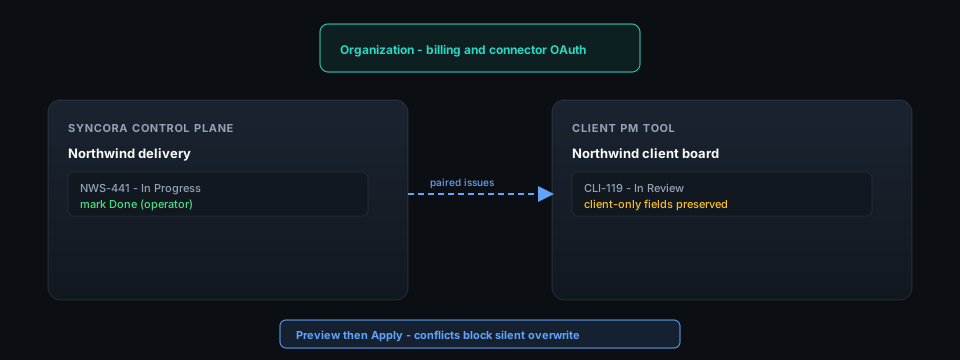
Work happens inside Syncora. Status sync proposes sanitized changes to the connected client tool. You see the diff; conflicts block silent overwrite.
- ·Preview → apply flow for writeback
- ·Rate limits protect provider APIs and your org
- ·Kill switches per org when you need to stop automation fast
Distill issues into tasks you can triage
Issue descriptions from any connected tool are uneven. Distillation maps text to a stable task schema so PMs and leads review the same shape every time.
- ·Defined output fields—not free-form chat paste
- ·Usage metered by plan; limits visible before you run
- ·Onboarding dry-run so trials do not surprise your bill
Feature request distilled for sprint planning
Harbor Logistics
Before — Client PM issue
HBR-902
portal dashboard
they want a dashboard in the client portal. shipments + invoices maybe? ask morgan what columns. should match brand. v1 is fine
After — Distilled task
Client portal v1 dashboard: shipments and invoices
Add a client-portal dashboard showing open shipments and recent invoices with brand-aligned layout.
Improvement · 8 pts · frontend, backend, qa
- ·Dashboard loads under 2s with seed data on staging
- ·Meets client-safe visibility contract (no internal notes exposed)
2 clarification questions
Org billing, workspace delivery
The organization is your SaaS tenant—members, roles, Stripe billing. Workspaces are where teams, clients, and projects execute across connected tools.
- ·Role-aware access for owners, admins, and members
- ·Connector OAuth scoped per org (Linear today)
- ·Path from signup wizard to first workspace without a services engagement
Answer "what changed?" from one log
Org audit entries cover membership, billing, integrations, and automation—not an afterthought bolted on later.
- ·Immutable audit log with actor and timestamp
- ·Correlation IDs across web requests and Celery jobs
- ·Fits fractional CTO review: traceable, exportable mindset
Async work that does not block triage
Provider calls and sync batches run on a queue. The UI shows job state; operators are not stuck on a spinner during a long sync.
- ·Status sync and provider automation as jobs
- ·Headers propagate org and correlation context to workers
- ·Observable failures—structured logs and correlation context without token leakage
Ready to run delivery on one control plane?
Connect Linear today, try distillation on the Free plan, and see Client Board plus sync preview before anything writes back.