
How Syncora fits your delivery loop
Syncora is the agency control plane. Connect a client PM tool, run delivery inside Syncora, share Client Board and Meeting Mode, then preview and sync sanitized progress back.
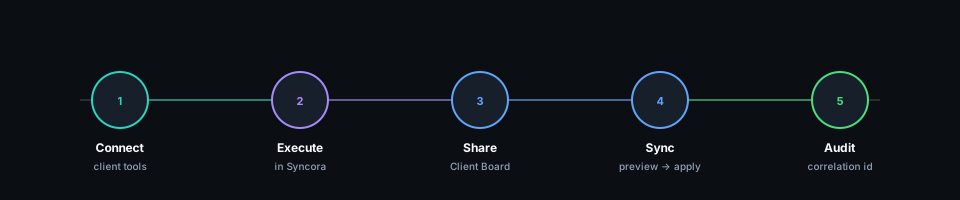
Connect client tools
OAuth per organization ties a client PM provider to your billing tenant. Linear is available today. Asana is next; Jira and more providers follow. Clients keep their preferred tools—no forced migration.
Execute in Syncora
Plan, track, and distill work in the agency system of record. Issue text maps to distilled-task.v1 fields: summary, requirements, definition of done, and clarification questions. Internal context stays internal.
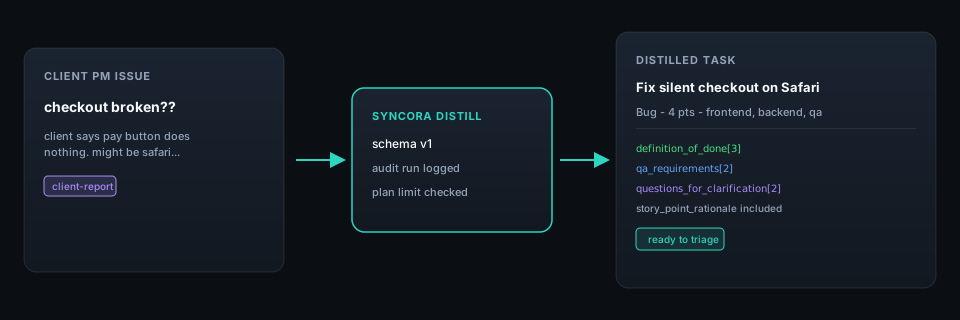
Bug triage from a vague client report
Riverside Retail
Before — Client PM issue
RIV-1842
checkout broken??
client says when they hit pay nothing happens. might be safari. ops saw it too last week. need fix before thursday launch — screenshot in slack thread
After — Distilled task
Fix silent checkout failure on Safari payment submit
Payment submit on checkout fails silently in Safari; users see no error and orders do not complete.
Bug · 4 pts · frontend, backend, qa
- ·Failed payment shows user-visible error with support reference id
- ·No silent no-op on pay click in Safari
2 clarification questions
Client Board
Share a sanitized, client-facing view of delivery status. Controlled transparency—clients stay informed without access to internal triage, notes, or agency-only context.
Meeting Mode
Switch Client Board into a meeting-ready surface for stakeholder reviews. Progress snapshots and action tracking stay clear; deep execution detail stays out of the room.
Preview, sync back, audit
Proposed writebacks to the connected client tool appear in preview. Operators apply when ready; conflicts block silent overwrite. Org actions and automation runs land in an immutable audit log with correlation IDs.
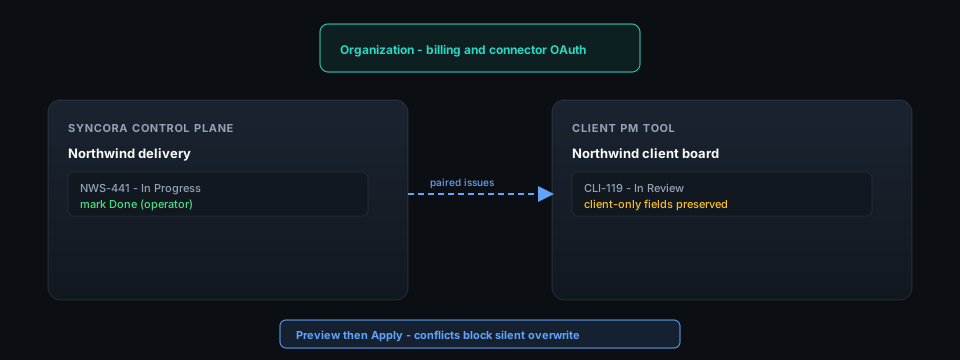
Cross-workspace status alignment with preview
Northwind Studio
Before — Client PM issue
NWS-441
sync status to client board
when we mark done in delivery workspace it should show on client linear too. right now PM copies status by hand. don't overwrite client-only fields
After — Distilled task
Preview status sync from delivery to client workspace
Sync task status from delivery workspace to client workspace via preview-then-apply, preserving client-only fields.
Revision · 4 pts · frontend, backend
- ·Operator can preview and apply status sync in one flow
- ·Conflicts block silent overwrite
1 clarification question
Honest product ladder
Linear today. Asana next. Jira and more later—always with Syncora as the control plane.
Available
Linear
Connector available — OAuth, import/pair, preview-then-apply sync.
Next
Asana
Next connector — same agency control-plane model, client keeps Asana.
Future
Jira & more
Future providers — expand without asking clients to migrate.
Ready to run delivery on one control plane?
Connect Linear today, try distillation on the Free plan, and see Client Board plus sync preview before anything writes back.